HubSpot Alternatives for Small Business: What I Found Testing Capsule and EngageBay, Plus 2 More
This post contains affiliate links. If you buy through them, we may earn a commission at no extra cost to you. Learn more.
HubSpot is often the first name people hear when they start looking for a CRM. The free version is generous, and the whole thing looks polished. But many small business owners hit the same wall: once you need more than the basics, the price can climb much faster than your business does. That’s usually when people start searching for HubSpot alternatives for small business.
I run a small online business from Japan, and I’ve spent time hands-on with two tools that often come up as cheaper options: Capsule CRM, which I used to manage contacts, deals, and tasks, and EngageBay, which I used to send my first email campaign. Below, I share what I saw in each, then compare them with two more alternatives and with HubSpot itself.
A quick note on links: the Capsule CRM and EngageBay links in this article are affiliate links. We earn a commission if you sign up for Capsule CRM or EngageBay through our links, at no extra cost to you. The other tools here are not linked as affiliates.
Why small businesses look beyond HubSpot
To be fair to HubSpot, its free CRM is a solid place to start. According to its pricing page, it’s free for up to two users and 1,000 contacts, with no credit card required and no time limit.
The questions usually come later:
- The jump between plans can be big. HubSpot’s pricing page lists its Starter plan at a regular price of $20 per seat per month (it sometimes shows a discount for new customers). But its Marketing Hub Professional plan is listed from $800 a month with three seats included, and the page notes a required one-time onboarding fee of $3,000.
- You may only need part of it. If all you want is a clean list of customers, a simple pipeline, and a newsletter now and then, a large platform can feel like more than you need.
- Small teams need to keep costs low. When every dollar matters, a tool built around small teams can be a better fit.
I want to be clear that I haven’t used HubSpot’s paid plans myself. The numbers above come from HubSpot’s own pricing page.
How I judged each alternative
I kept the criteria simple, because the goal is simple: find a tool a small team can set up quickly and afford as it grows.
1. How quickly you can get going
Can you add a contact, create a deal, or send an email without reading a manual?
2. What the free plan really allows
Most small businesses start free. I looked at how far the free plan goes before you need to pay.
3. What you pay once you grow
A low first price matters less than what you’ll pay a year from now with a few more people and contacts.
4. What it covers: CRM only, or CRM plus email
Some tools focus on managing customers and deals. Others bundle email marketing and support. Knowing which one you need saves money.
Capsule CRM: a calm, simple CRM
Capsule is the CRM I tried myself. I signed up for the free plan and spent about two hours adding test contacts, building a deal, and setting tasks. (I wrote about it in more detail in my simple CRM comparison.)
What it felt like to use
The first thing I noticed was how easy the screen is on the eyes. It’s mostly white with a purple-blue accent for the important buttons, and things that need attention change color. Overdue tasks, for example, get a red “Overdue” label that I spotted right away.
Each contact took me about three minutes to add. The form had just the right number of fields: name, job title, company, email, phone, and location, without a wall of boxes. Edits showed up immediately.
Deals live in a Sales Pipeline board with columns like New, Qualified, Meeting, and Proposal. I created a test deal for a $1,000 website redesign and moved it to the next stage just by dragging the card.
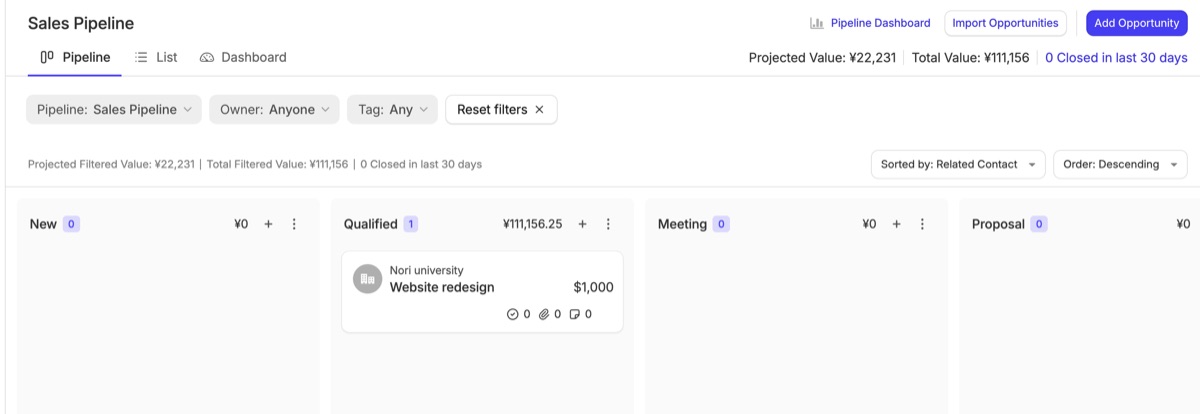
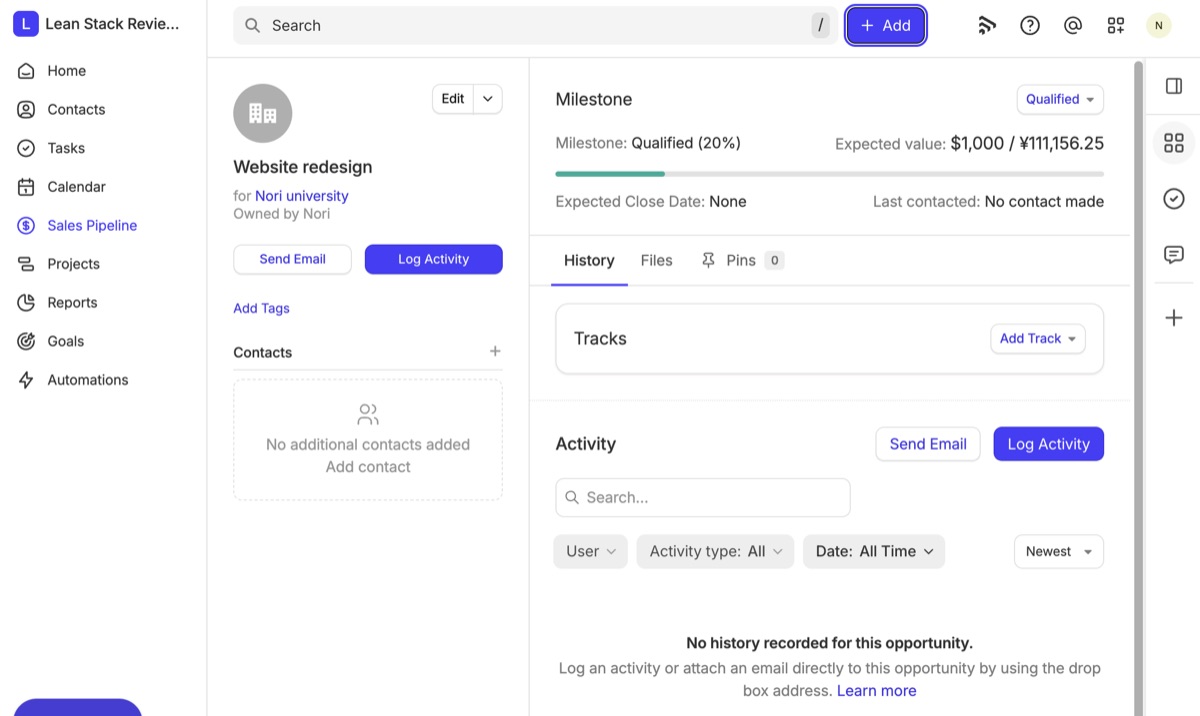
Something I didn’t expect: I entered the deal in US dollars, and Capsule also showed the value in Japanese yen. Capsule’s help pages explain that pipeline totals are worked out in your default currency using recent exchange rates. If you’re outside the U.S. and get paid in dollars, that’s handy.
When I had a question, I opened the help chat and asked in Japanese. An AI assistant answered in Japanese almost right away, with clear steps. I didn’t test how to reach a human or what their support hours are.
What gave me pause
- The free plan fills up fast. Capsule’s pricing page lists the free plan at up to 250 contacts and two users. If you already have a customer list, you may outgrow it quickly.
- Tags were a little unclear. Adding a tag was easy, but it wasn’t obvious to me where tags would show up or how I’d use them later.
What it costs
Capsule’s pricing page lists four paid plans: Starter, Growth, Advanced, and Ultimate, all priced per user, per month. When I checked, Starter was $22 per user a month billed monthly, or $18 if you pay yearly. The paid plans also come with a 14-day free trial with no card required.
Who it fits: a team of one to three people using a CRM for the first time. Who it may not fit: a larger team that needs detailed analytics and lots of automation from day one.
EngageBay: email marketing and CRM in one place
EngageBay presents itself as one platform for marketing, sales, and support, which is why it often comes up as a lower-cost alternative to HubSpot. I used its free plan to send my first email campaign. (The full walkthrough is in my guide to email marketing tools for beginners.)
What it felt like to use
Signing up was simple. It took me about six minutes, and I didn’t have to enter a credit card. Before I could build an email, EngageBay asked me to confirm my sender address, which is a normal and sensible step.
Picking a template was the fun part. There were a lot of ready-made designs, sorted into categories like general, offers, and education, and browsing them was genuinely enjoyable.
What gave me pause
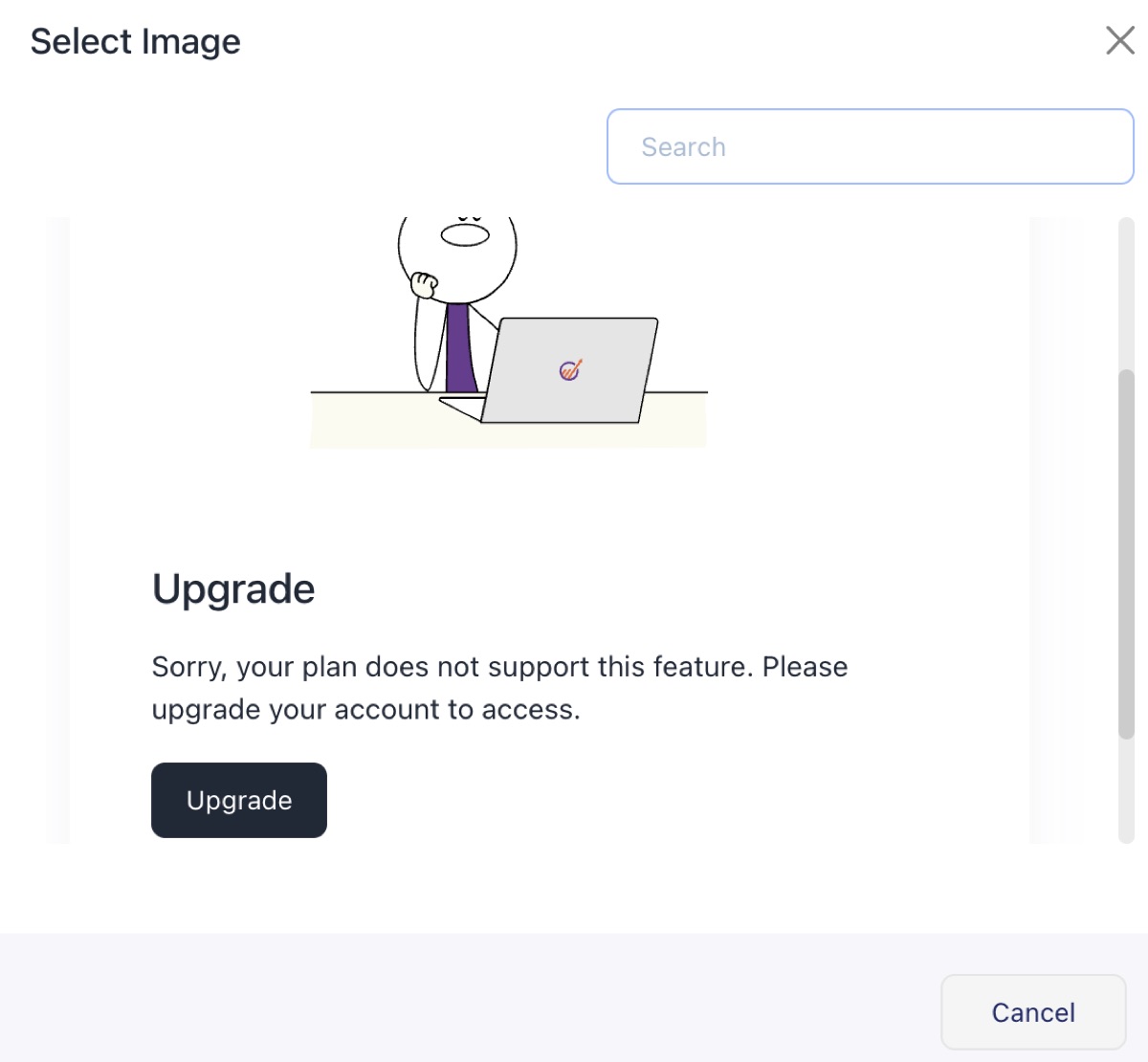
- I couldn’t swap the template photos on the free plan. When I tried to replace a template’s photo with my own image, I got this message: “Sorry, your plan does not support this feature. Please upgrade your account to access.” I could edit the text, but not the pictures.
- The report took time to fill in. Right after sending, the report showed zeros. When I came back the next day, the numbers were there. Give it a day.
- Expect to hear from sales. Within a couple of days of signing up, I got several phone calls and an email from EngageBay’s sales team. I didn’t take the calls. If you’d rather test quietly on your own, it can feel like a bit much.
One more thing from my test: my first email landed in my Gmail spam folder. I had skipped an optional setup step (SPF and DKIM, settings that prove you’re allowed to send from your address), so that’s on me, and EngageBay does point you to it before you send. Still, set it up before you send for real.
What it costs
According to EngageBay’s pricing page, the free plan includes 250 contacts and 1,000 branded emails, covers teams of up to 15 members, and doesn’t require a credit card. Paid plans are priced per user, per month: Basic was $14.99 billed monthly when I checked, with lower prices if you pay yearly or every two years.
Who it fits: someone who wants to start email marketing without paying anything yet. Who it may not fit: someone who wants beautiful emails with their own photos from day one, since that needs a paid plan.
How they compare with HubSpot and two more alternatives
I’ve used Capsule and EngageBay hands-on, as described above. For HubSpot, Zoho CRM, and Freshsales, the details below come from each company’s own pricing page, not my own testing.
| Tool | Best for | Free plan or trial | Paid plans start at | Email marketing built in? |
|---|---|---|---|---|
| HubSpot | A large platform you can grow into | Free CRM (2 users, 1,000 contacts, no card) | Starter at $20 per seat/month at the regular price | Yes, on Marketing Hub plans |
| Capsule CRM | A simple, calm CRM for small teams | Free plan (250 contacts, 2 users); 14-day trial of paid plans, no card | $22 per user/month ($18 if paid yearly) | No, it focuses on contacts, deals, and tasks |
| EngageBay | Email, CRM, and support in one place on a budget | Free plan (250 contacts, 1,000 branded emails, up to 15 members, no card) | $14.99 per user/month billed monthly (less if paid yearly or every two years) | Yes |
| Zoho CRM | A free CRM for slightly larger small teams | Free edition for up to 3 users; free trial of paid plans | Price not clearly shown on the page; the page says yearly plans save up to 34% | Not checked |
| Freshsales | A CRM with a longer trial | No free plan; 21-day trial | $9 per user/month, billed yearly | Not checked |
Prices are in US dollars, as shown on each company’s pricing page when I checked. They change from time to time, so check before you sign up.
Zoho CRM
Zoho’s pricing page describes its approach as “Sensational software. Sensible price.” Its free edition supports up to three users, one more than the free plans from HubSpot and Capsule. Its paid plans are priced per user, and the page notes savings of up to 34% for paying yearly. I couldn’t read the exact price of its Standard plan from the page, so check it yourself if Zoho is on your list.
Freshsales
Freshsales, from Freshworks, doesn’t have a free plan, but it offers a 21-day trial, one of the longer ones here. Its Growth plan starts at $9 per user a month when billed yearly. After the trial, you choose a plan and pay by card to continue.
Which HubSpot alternative fits you best
Here’s how I’d think about it, based on my time with Capsule and EngageBay and what the others say about themselves.
If you mainly need to keep track of customers and deals
Capsule CRM is where I’d start. Everything I tried, from contacts to the pipeline to tasks, worked without reading the help docs, and the screen stays calm. It’s built for small teams, and it handles different currencies nicely.
If you want email marketing and contacts together, free to start
EngageBay lets you try email marketing, a CRM, and support tools on a free plan without a card. Just know that using your own images in emails needs a paid plan.
If you need a free CRM for three people
Zoho CRM’s free edition covers up to three users, according to its pricing page.
If you’d like more time to decide
Freshsales gives you a 21-day trial.
When HubSpot may still be the right call
If you’re confident you’ll want advanced marketing automation and a large set of connected tools, and you have the budget for higher plans, HubSpot may still make sense. Its free CRM is also a reasonable place to start if two users and 1,000 contacts are enough for you.
Tips before you switch from HubSpot (or before you start)
- Write down what you actually use. If it’s just contacts, a pipeline, and the occasional email, you may not need a large platform.
- Try the free plan with your real workflow. Add a few contacts, create one deal, and send one email to yourself.
- Check the next price, not just the first one. Look at what you’d pay with one or two more people.
- Set up your email sending settings early. If you’ll send newsletters, set up SPF and DKIM before your first real campaign. My test email landed in spam without them.
Frequently asked questions
What is the best HubSpot alternative for a small business?
It depends on what you need. If you mainly manage customers and deals, Capsule CRM felt simple and calm in my testing. If you want email marketing and a CRM together on a free plan, EngageBay is worth a look. Zoho CRM and Freshsales are other options, based on their pricing pages.
Is there a free alternative to HubSpot?
Yes. Capsule CRM and EngageBay both have free plans with 250 contacts, and Zoho CRM has a free edition for up to three users, according to their pricing pages. HubSpot’s own free CRM is also an option.
Is Capsule CRM cheaper than HubSpot?
It depends on the plan you compare. Capsule’s Starter plan was $22 per user a month billed monthly when I checked, while HubSpot lists its Starter plan at $20 per seat a month at the regular price and sometimes shows a discount. The bigger difference is at the higher end, where HubSpot’s Marketing Hub Professional is listed from $800 a month plus a one-time onboarding fee.
Does EngageBay replace HubSpot’s marketing tools?
EngageBay offers email marketing, a CRM, and support tools in one place. I’ve only tested its free plan for sending an email campaign, so I can’t compare its advanced marketing features with HubSpot’s.
Do I need a credit card to try these tools?
Not for HubSpot’s free CRM, Capsule’s free plan and paid-plan trial, or EngageBay’s free plan, according to their pricing pages. Freshsales says you pay by card to continue after its 21-day trial.
Try one before you decide
The best way to choose is to spend an hour in one tool with your own real customers and tasks. If you mostly need a calm, simple CRM, start with Capsule’s free plan. If you want to send emails and keep contacts in one place without paying yet, try EngageBay’s free plan. Both let you start without a credit card.