Choosing an Online Community Platform for Creators: My Hands-On Look at Circle, Plus 4 Alternatives
This post contains affiliate links. If you buy through them, we may earn a commission at no extra cost to you. Learn more.
A group chat works fine for your first twenty members. Then the good questions get buried, new people ask the same thing again, and you start wishing your community had a real home. That’s usually the moment people start searching for an online community platform for creators.
I run a small online business from Japan, and I wanted to see what building a community on one of these platforms actually feels like. So I started a free trial of Circle, set up a space, wrote a first post, invited a test member (my own second email address), and looked at everything again from the member’s side, on my laptop and on my phone. Then I compared it with four other platforms that creators often consider.
A quick note on links: the Circle links in this article are affiliate links. We earn a commission if you sign up for Circle through our links, at no extra cost to you. The other platforms here are not linked as affiliates.
Here’s what I found, including two things I’d want to know before signing up.
Why a group chat stops being enough
Most communities start somewhere free: a messaging group, a social media group, or a chat server. That’s a sensible way to begin. But as a community grows, a few problems tend to show up:
- Everything scrolls away. Useful answers disappear under newer messages, and you end up repeating yourself.
- Members can’t find their way around. There’s no clear place for introductions, questions, or announcements.
- It doesn’t feel like yours. The space carries another company’s look and rules, and you can’t easily charge for access or add a course later.
A community platform tries to fix all three. Posts stay organized in separate areas, members have profiles, and you can usually add courses, events, or paid access when you’re ready.
The tricky part is that these platforms look similar on the surface but differ a lot in pricing, fees, and how much they focus on community versus courses.
How I judged each platform
I kept the criteria simple, because a creator choosing a first community platform needs answers to a handful of questions, not a 50-row spreadsheet.
1. How it feels to post and read
If posting feels clunky, members stop posting. I looked at how familiar the posting screen feels and how easy it is to add an image.
2. How easy it is for members to join
Every extra step at sign-up loses people. I looked at what a new member has to fill in before they’re inside.
3. How it works on a phone
Many members will only ever open your community on their phone. A platform that falls apart on a small screen is a problem, even if there’s an app.
4. What it costs to start, and the fees on sales
Price is more than the monthly fee. If you plan to charge for membership, the platform’s cut of each sale matters just as much.
Circle: what happened when I built a community on the trial
Circle is the one I tried myself, so this section is the most detailed. Everything below comes from what I saw on my own screen during the free trial.
Signing up
Signing up took me about two minutes, and I wasn’t asked for a credit card. Circle’s pricing page says the same: a 14-day free trial with no credit card required. After logging in, a setup checklist walks you through the basics, like creating your first spaces and preparing to launch.
Spaces: the rooms of your community
In Circle, your community is split into spaces. Think of them as rooms: one for introductions, one for questions, one for a course, and so on. When you create a space, you pick a type, such as posts, chat, a course, images, or events, and decide who can see it.
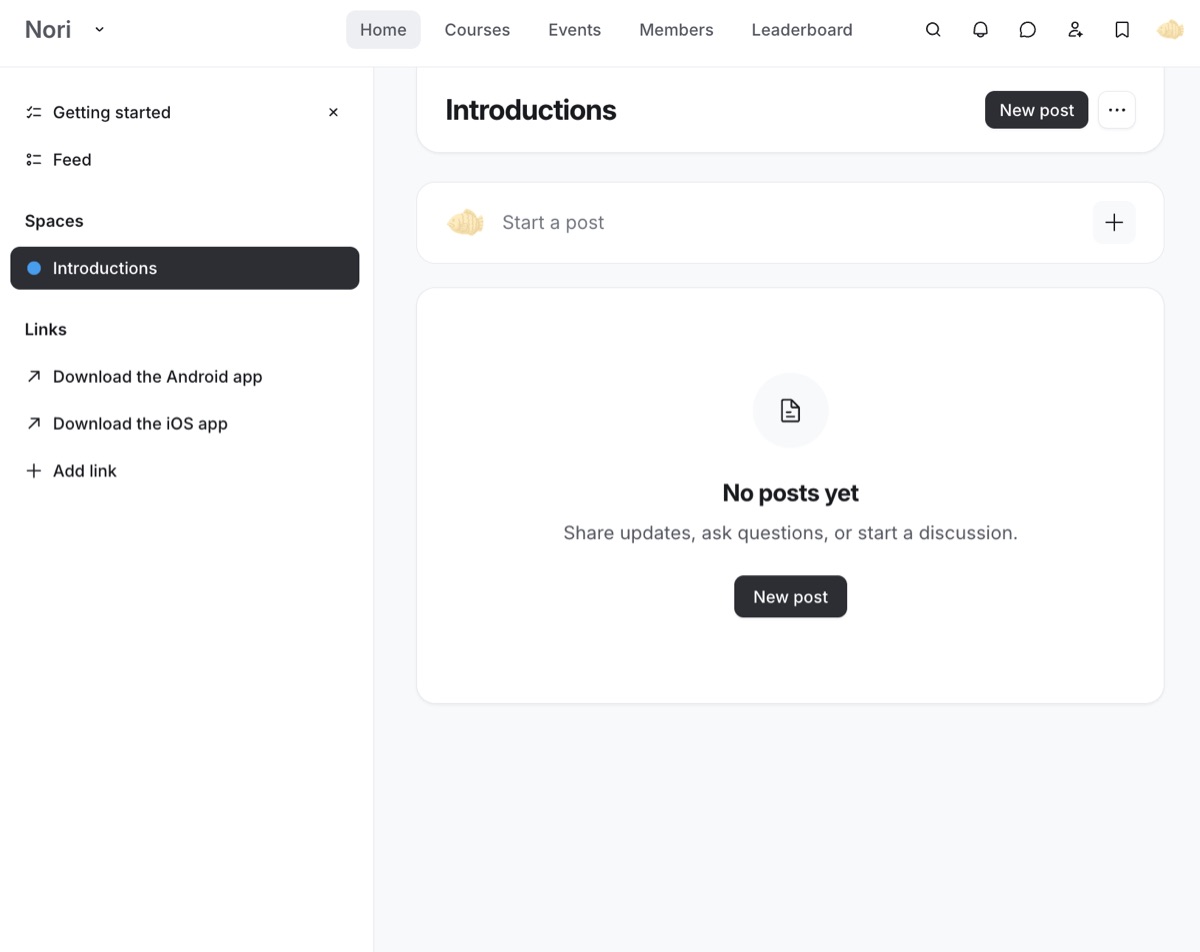
I made a posts space called “Introductions.” It appeared in the left menu right away, with a “Start a post” box at the top and a friendly “No posts yet” message inviting the first post.
Writing the first post
This was the part I enjoyed most. The posting screen felt a lot like posting on social media: a title, a message, and a row of buttons for images, video, GIFs, files, emoji, and more. I didn’t have to figure anything out first. I just wrote and posted.
Adding an image was easy too. I picked an illustration from my computer, it dropped right into the post, and nothing was locked on the trial. The finished post showed my name with an “Admin” label, the image displayed large, and Like and Comment buttons underneath, the same kind of layout most people already know from social apps.

Right after I published, Circle offered to send an email about the post to my members and said it had already drafted one. I didn’t send it, since I was the only member, but it’s a handy way to reach people who don’t check the community every day.
Inviting a member, and joining as one
To see the member side, I invited my own second email address as a test member. In my account, the invite option wasn’t on the Members page itself. I found it under Manage audience, then Add, then Invite members. You can invite people one at a time by email or import a CSV list.
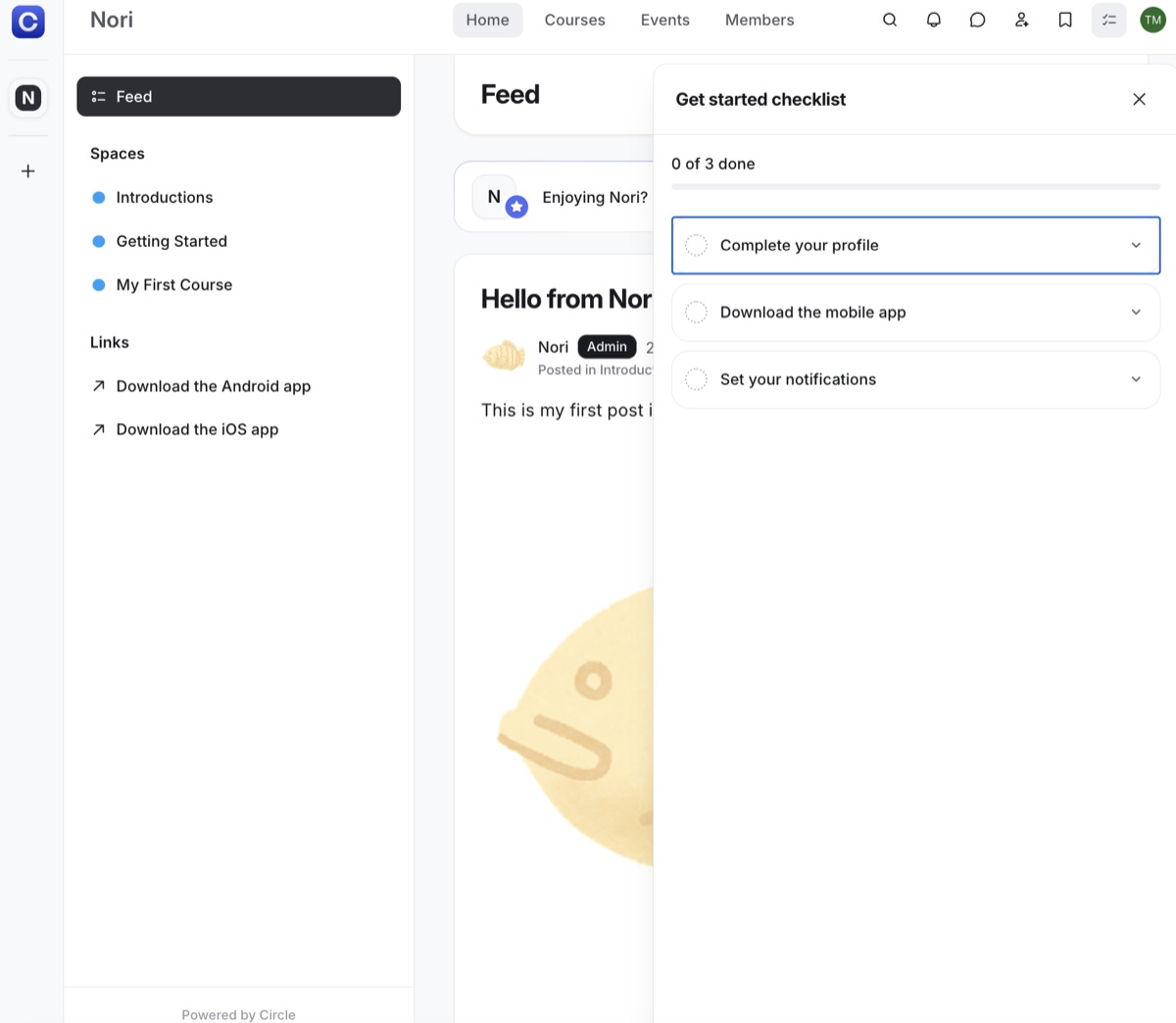
The invitation reached my Gmail inbox, not the spam folder. Joining asked for only a name and a password. The email address was already filled in from the invite. After a short profile page, where my email was hidden by default, the test member landed in the community with the spaces in the left menu and my first post in the feed. A small “Get started checklist” also opened on the side, suggesting things like completing a profile and downloading the mobile app.
On my phone
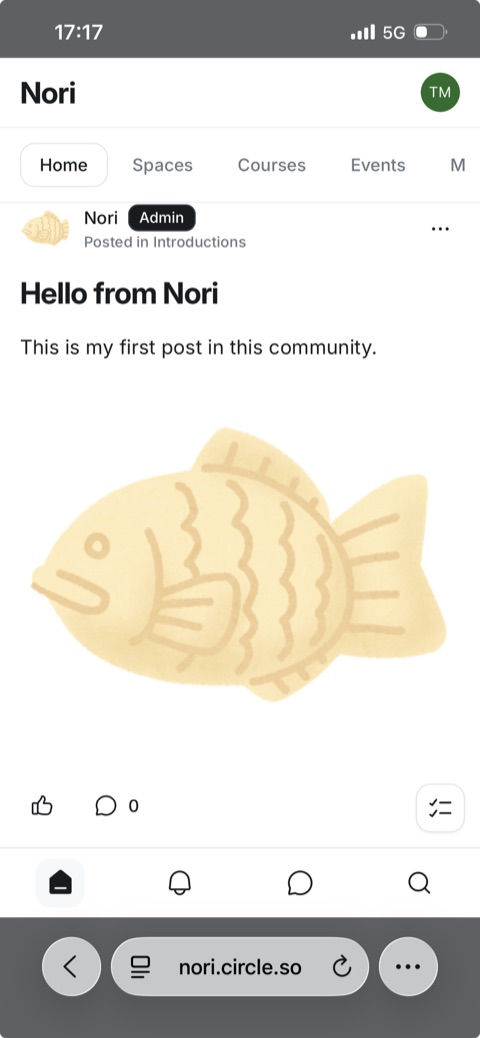
I also logged in as the test member in Safari on my iPhone, and this was a nice surprise. Even in the browser, it felt close to using an app. The post filled the width of the screen, the image fit neatly, and there was a menu bar at the bottom with home, notifications, messages, and search. Nothing looked broken. Safari also showed a banner for Circle’s own app, but I didn’t need it to get around.
Two things I’d want to know before signing up
There’s no free plan. Circle offers a 14-day trial, and after that you need a paid plan to keep going. Since I never entered a card, my trial simply ended rather than turning into a charge, so trying it is low-risk. But if you want to start a small community for free and only pay once it grows, Circle doesn’t offer that path.
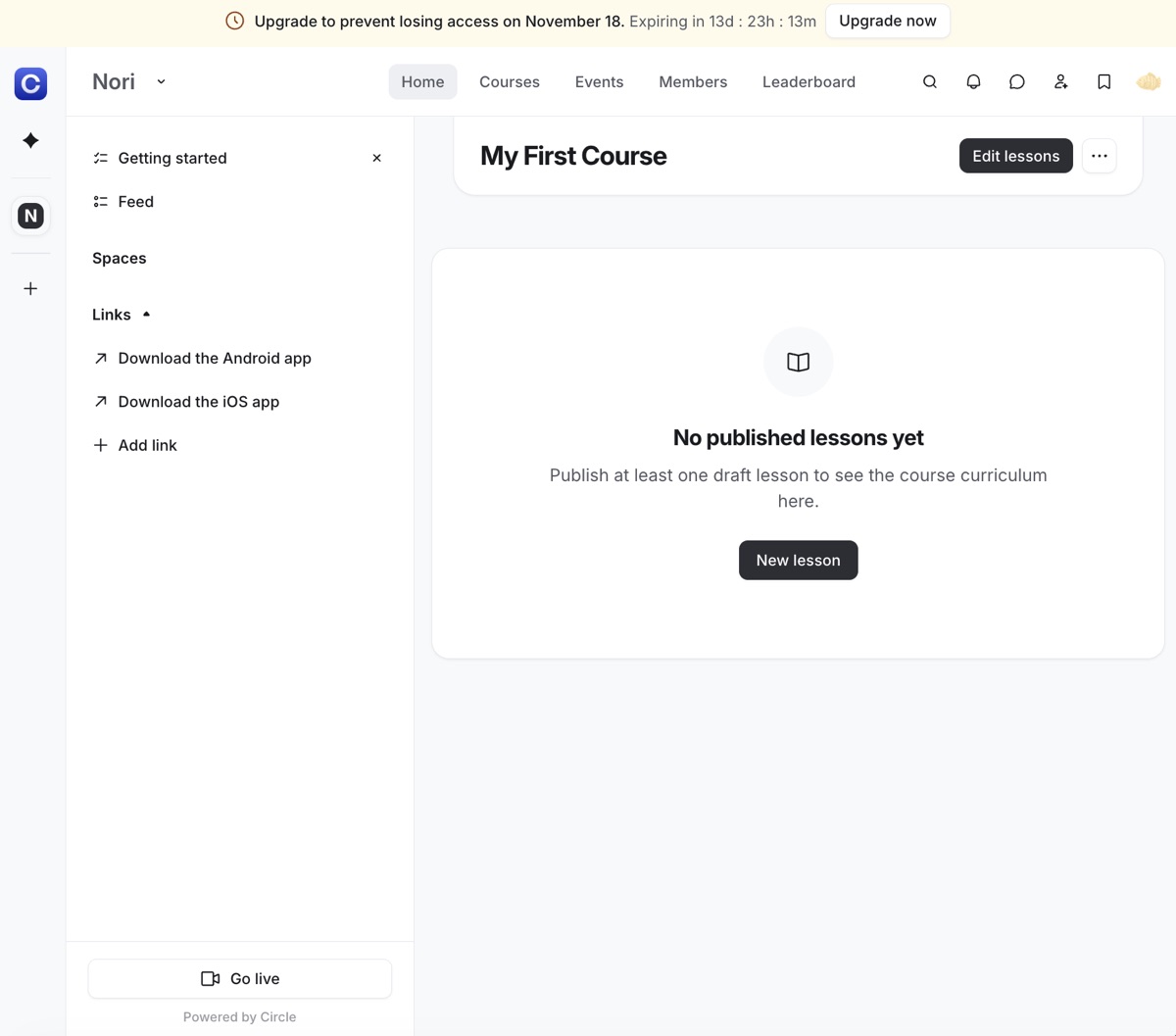
The countdown banner. Partway through setting things up, a yellow banner appeared at the top of the screen telling me to upgrade before access ran out, with a live countdown in days, hours, and minutes. It stayed on every page while I worked. It’s useful to know when the trial ends, but having a countdown on screen the whole time made the trial feel a little rushed. If you like to explore slowly, it may bother you too.
What I didn’t test
I didn’t create events, use the chat-type spaces, set up paid memberships or a paywall, connect payments, or use the Android or iOS apps. I also haven’t used a paid plan. So I can’t speak to those parts from experience.
Circle’s pricing in plain terms
According to Circle’s pricing page, plans start at $89 a month for the Professional plan, shown with yearly billing. Professional already includes courses, and Circle takes a 2% fee on sales on that plan. Higher plans lower the fee to 1% and let you remove Circle’s branding. During my trial, a small “Powered by Circle” line sat at the bottom of the menu.
How Circle compares with 4 other community platforms
I want to be up front: Circle is the only platform here I’ve used hands-on so far. For the other four, the details below come from each company’s own pricing page, not my own testing. I’ll update this comparison as I try them myself.
| Platform | What it focuses on | Free trial | Paid plans start at | Platform fee on sales |
|---|---|---|---|---|
| Circle | Community spaces with courses, events, and chat | 14 days, no card required | $89/month (Professional, billed yearly) | 2% on Professional; 1% on higher plans |
| Skool | One simple setup with community and courses | “Try for free” (length not stated on the pricing page) | $9/month (Hobby); Pro is $99/month | 10% on Hobby; 2.9% on Pro |
| Mighty Networks | Community business with courses and payments | 14 days, no card required | $79/month (Launch) | 2% on Launch; lower on higher plans |
| Heartbeat | A paid community with courses built in | 14 days, no card required | $49/month (Build); $40/month if paid yearly | 5% on Build, on top of card processing fees |
| Kajabi | Courses and coaching first, with a community included | 14 days (card requirement not stated) | $179/month (Basic); $143/month if paid yearly | No revenue share; standard card processing fees apply |
Prices are in US dollars, as shown on each company’s pricing page when I checked. Card processing fees from services like Stripe are usually charged on top of the platform’s own fee. Prices and fees change from time to time, so check each pricing page before you sign up.
Skool
Skool’s pricing page is short and simple: two plans, Hobby and Pro, both with unlimited courses and the option to use your own web address. The low starting price stands out. The trade-off is the fee on sales: 10% on the Hobby plan, and 2.9% on Pro. If you plan to charge for membership, that difference adds up fast, so it’s worth doing the math for your expected income before choosing a plan.
Mighty Networks
Mighty Networks presents itself as a home for building a community business. Its Launch plan includes courses and takes a 2% fee on payments, which goes down to 0.5% on its higher plans. The pricing page offers a 14-day trial with no credit card required, and a yearly billing option that it describes as two months free.
Heartbeat
Heartbeat describes itself as a platform for building a community people will pay for. Its starting plan is cheaper than Circle’s and includes courses, but its fees on sales are higher at the entry level: 5% on the Build plan, added on top of the card processing fee. It also offers a 14-day trial with no credit card required.
Kajabi
Kajabi comes at this from the other direction. It’s built mainly for selling courses, coaching, and memberships, and every plan includes a private community. It’s the most expensive starting point here, but its pricing page says it takes no share of your revenue. If your main product is a course and the community is a bonus, Kajabi is worth a look. If the community itself is the product, the platforms above focus more on it.
Which community platform fits you best
Here’s how I’d think about it, based on my time with Circle and what the others say about themselves.
If you want your community to feel familiar from day one
Circle is where I’d start. Posting felt like using a social app, members joined with just a name and a password, and the community worked smoothly in my phone’s browser. If you’d like to add a course later, it’s already included on the entry plan. (I walked through building a small course on Circle in my comparison of course platforms with community.)
If you want the lowest monthly price
Skool’s Hobby plan has the lowest monthly fee in this list. Just keep its 10% fee on sales in mind if you plan to charge members.
If your course is the main product
Kajabi puts courses and coaching first and includes a community on every plan, so you don’t need two separate tools.
Who Circle probably isn’t for
If you want to start a small community completely free and only pay once it grows, Circle isn’t built for that. There’s no free plan, only the 14-day trial.
Tips before you launch your community (on any platform)
A few things I learned that apply no matter which platform you pick:
- Write the first post yourself. An empty community feels awkward to join. Even a short “Hello, introduce yourself here” post gives members something to reply to.
- Start with just two or three spaces. Introductions, questions, and announcements are plenty at the start. You can add more as conversations grow.
- Join your own community as a member. Inviting my second email address showed me exactly what a new member sees, including the welcome checklist. It took the guesswork out.
- Check it on your phone. Many members will never open your community on a computer.
Frequently asked questions
What is the best online community platform for creators?
It depends on how you plan to earn and what your members need. In my testing, Circle felt very approachable for building the community itself: posting was familiar, joining was simple, and it worked well on a phone. If you need the cheapest monthly plan, or your course matters more than the community, another platform may fit better.
Does Circle have a free plan?
No. Circle offers a 14-day free trial with no credit card required, according to its pricing page. After the trial, you need a paid plan to keep using it. In my case, since I hadn’t entered a card, the trial simply ended without a charge.
What do members need to join a Circle community?
When I joined through an invitation, I only had to enter a name and a password. The email address was filled in from the invite. After that, there was a short optional profile page, and the email address was hidden from other members by default.
Can members use Circle on their phones?
Yes. I logged in as a test member in Safari on my iPhone, and posts and images fit the screen neatly, with a menu bar at the bottom that felt close to an app. Circle also has its own iOS and Android apps, which I haven’t tried.
How is Circle different from Skool?
Based on their pricing pages, Skool has a lower starting price, while Circle’s entry plan costs more but takes a smaller fee on sales than Skool’s Hobby plan. I’ve only used Circle hands-on, so for the day-to-day experience of Skool, I’d suggest trying it yourself.
Try it before you decide
The best way to choose a community platform is to set one up and look at it through a member’s eyes. Create one space, write a short welcome post, and invite your own second email address. In half an hour, you’ll know whether it feels like home.
If a community that feels familiar to post in and easy to join on a phone sounds right for you, Circle’s 14-day trial is an easy start, and it doesn’t ask for a credit card.